20-Point On-Page SEO Checklist for Every Page
A 20-point on-page SEO checklist you can run on every page before you publish, with a free way to check each point and a five-step plan for fixing existing pages.
An on-page SEO checklist is a list of the things to check on every page so Google and AI answers understand it and rank it: search intent, title tag, headings, content, links, images, speed and schema. Run the 20 points below before you publish and whenever an important page loses traffic.
Each point says what to do and how to check it in a few minutes, with free tools. We have kept it practical for Indian sites, where most visitors arrive on a phone.
What is an on-page SEO checklist?
It is a repeatable set of checks for the parts of a page you control: the words, the code in the head, the links and the media. It does not cover backlinks from other sites, which are off-page SEO.
| Stage | Checklist points | Free tool to check |
|---|---|---|
| Before you write | 1 to 4: intent, keyword, format, information gain | Google search, People Also Ask |
| Title, URL and meta | 5 to 8: title tag, meta description, slug, one H1 | Rank Math or Yoast preview |
| Content structure | 9 to 13: answer first, headings, lists, keywords, trust | Your own reading, Hemingway |
| Links and images | 14 to 17: internal links out and in, sources, images | Google Search Console |
| Technical | 18 to 20: mobile, Core Web Vitals, schema and indexing | PageSpeed Insights, Rich Results Test |
Free playbook
Get the free SEO Playbook
A 25-page guide covering keyword research, content, on-page and technical SEO, Core Web Vitals, local SEO in India, link building, AI search and a 90-day plan. We email it to you, plus occasional new guides. Unsubscribe anytime.
What should you check before you write the page?
Check what the searcher wants and what already ranks before you write a word. Most pages that never rank fail here, not on technical details.
1. Match the search intent
Search your keyword and look at the top results. If they are all guides, a product page will struggle, and if they are all product pages, a long guide will too.
2. Pick one primary keyword per page
Give each page one main keyword and a few close variations. Two pages on the same keyword compete with each other. Our free keyword research guide shows how to find and group them.
3. Copy the winning format
If the top five results are numbered lists, tables or step-by-step guides, use the same format. Then make yours clearer and more complete.
4. Add something the top results lack
This is your information gain: a worked example, a comparison table, an India-specific detail such as ₹ prices or UPI, or a checklist nobody else has. Ahrefs lists information gain as a separate point on its own checklist for this reason.
How do you optimise the title tag, URL and meta description?
Write a unique, specific title with the keyword near the start, a meta description that sells the click, a short URL and one H1. These four points decide whether people click your result.
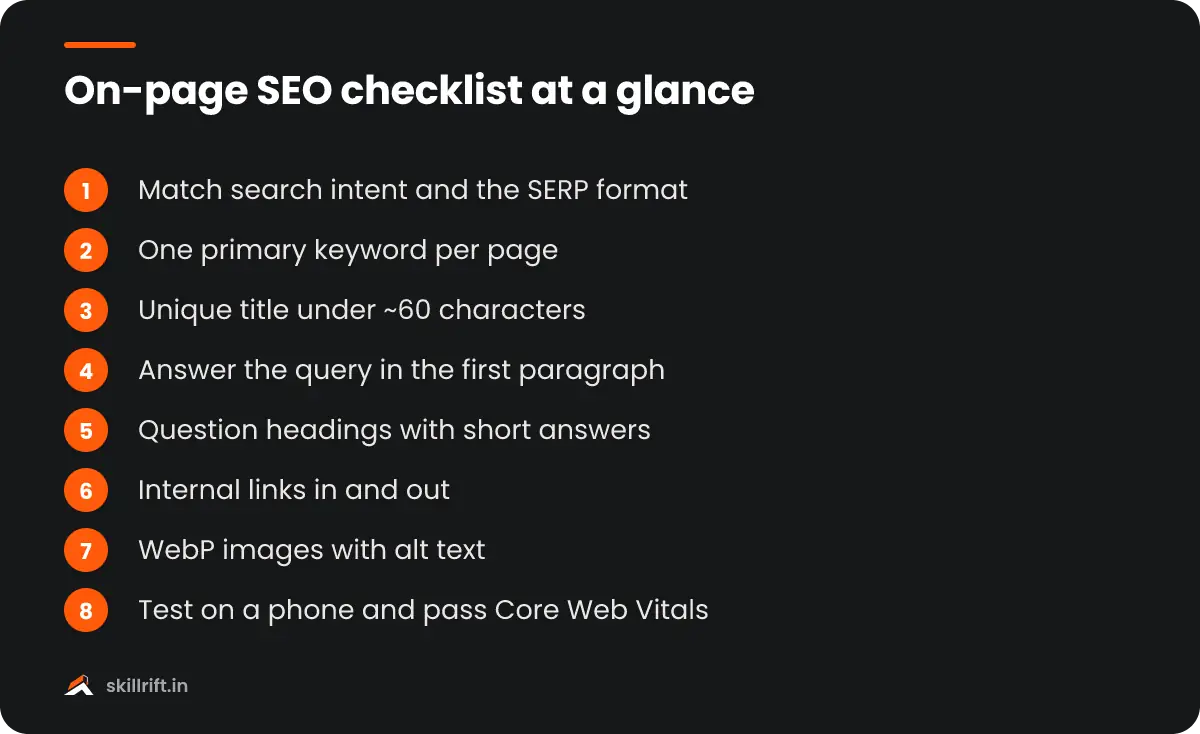
5. Write a clear, unique title tag
Put the keyword in the first few words and keep the title under about 60 characters, because Google shortens long ones to fit the screen. Google’s title link guidelines ask for descriptive, concise titles on every page and warn against vague labels such as “Home”.
a good title is unique to the page, clear and concise, and accurately describes the contents of the page.
Google Search Central, SEO Starter Guide
6. Write a meta description that earns the click
Summarise what the reader gets in 120 to 155 characters, with the keyword in the first sentence. Google does not always use it: its snippet documentation says snippets come mainly from page content, and the meta description is used when it describes the page better.
7. Keep the URL short and readable
Use lowercase words and hyphens, for example /blog/on-page-seo-checklist/. Leave out dates and stop words so the URL stays true when you update the page.
8. Use one H1 that matches the title
Most WordPress themes print the post title as the H1. Do not add a second H1 inside the content.
How should you structure the content on the page?
Answer the main question in the first two sentences, then give each sub-question its own heading. This helps readers skim and helps Google and AI tools pull a clean answer.
9. Answer the query in the first paragraph
Put a direct 40 to 60 word answer at the top. This is the passage most likely to be quoted in a featured snippet or an AI answer. Our guide to AI Overviews SEO explains how Google picks the sources it cites.
10. Write headings as the questions people ask
Use H2s for main sections and H3s inside them, and phrase several as real questions from People Also Ask. Each heading should open with a short answer that makes sense on its own.
11. Use lists and tables where they help
Steps belong in numbered lists and comparisons in tables. Ahrefs reports a jump of about 38.9% in estimated search traffic, plus 163 more featured snippets, after it reworked a page for featured snippets, as shown in its on-page SEO checklist.
12. Place the keyword naturally
Use the keyword in the title, the first paragraph, one H2, the URL and the meta tags, then write normally. Keep it under about 2% of the words and use variations instead of repeating the exact phrase.
13. Show who wrote it and why it can be trusted
Add an author name and bio, a visible updated date and links to the sources behind your numbers. This matters most on pages that give money, health or career advice.
Should you write for AI answers as well as Google?
Yes, and the same checklist covers both. Clear question headings, short direct answers, cited facts and tables are exactly what AI tools find easy to quote.
Which links and images does every page need?
Every page needs 3 to 5 internal links out, at least one or two internal links pointing in, a couple of trustworthy outside sources and compressed images with alt text.
14. Link out to related pages on your site
Use descriptive anchor text, such as “technical SEO audit” rather than “click here”. Google’s starter guide notes that link text tells users and Google something about the page you are linking to.
15. Get internal links pointing to the new page
Add a link to the new page from two or three older, related posts. A page with no internal links in is hard for Google to find and rank.
16. Cite outside sources for facts
Link to the original study, the platform’s own documentation or an official body, not to a blog that copied it.
17. Compress images and write alt text
Save images as WebP, set width and height, and write alt text that describes what the image shows. Keep file names descriptive, such as on-page-seo-checklist.webp.
What technical checks belong on an on-page SEO checklist?
Check that the page works well on a phone, loads fast enough to pass Core Web Vitals, has the right schema and is allowed to be indexed. These are quick checks with free Google tools.
18. Test the page on a phone first
In India, mobile had an 84.21% share of web traffic in October 2026, against 15.17% for desktop, according to StatCounter. Open your page on a mid-range Android phone on mobile data and check that text, buttons and tables fit the screen.
19. Pass Core Web Vitals
Aim for the “good” thresholds set out on web.dev: Largest Contentful Paint within 2.5 seconds, Interaction to Next Paint of 200 milliseconds or less and Cumulative Layout Shift of 0.1 or less, measured at the 75th percentile of page loads.
20. Add schema and confirm the page can be indexed
Add Article and FAQ schema where they fit, test it in Google’s Rich Results Test, and make sure the page is not set to noindex or blocked in robots.txt. Then use URL Inspection in Search Console to request indexing.
For the site-wide side, such as redirects, sitemaps and crawl errors, follow our technical SEO audit checklist.
How do you use this checklist on an existing page?
Start with pages that already get impressions but rank on page two, because small on-page fixes move them fastest. Fix one page at a time and measure.
- Find the pages: in Search Console, open Performance, sort pages by impressions and look for average positions between about 8 and 20.
- Check the query: see which searches the page appears for and whether the content really answers them.
- Run the 20 points: note each fail in a simple sheet with the page URL and the fix.
- Fix the big three first: intent, title tag and the opening answer usually matter more than the rest.
- Request indexing and wait: give it four to six weeks, then compare clicks and position with the period before.
If you want to learn this with hands-on projects, the SkillRift SEO course walks through on-page, technical and local SEO on real sites.
Our Take
Do not try to tick all 20 points on 50 pages at once. Pick your ten most important pages, fix search intent, the title tag and the first paragraph on each, and leave the rest for the next round. Those three decide whether the page matches what the searcher wants, and fixing them costs nothing. After that, test on a real phone on mobile data, because that is how most Indian visitors will see your page. Treat the checklist as a habit for every new page, not a one-time clean-up.
What are the common on-page SEO mistakes?
Most on-page problems come from writing for a keyword instead of for the person searching it. Watch for these.
- Writing a long guide when the top results show people want a quick list or a tool.
- Using the same title tag on several pages, or a vague one like “Services”.
- Stuffing the exact keyword into every heading.
- Burying the answer below a long introduction.
- Publishing a page with no internal links pointing to it.
- Uploading large PNG or JPG images without compression or alt text.
- Testing only on a desktop screen with fast Wi-Fi.
Frequently asked questions
What are the most important on-page SEO factors?
Matching search intent comes first, then a clear title tag, a heading structure that answers the main questions, useful internal links and a fast, mobile-friendly page. Keywords matter, but placing them naturally in the title, first paragraph and one heading is enough.
Is on-page SEO different from technical SEO?
Yes. On-page SEO covers what is on one page: content, title, headings, images and links. Technical SEO covers the whole site: crawling, indexing, site speed, redirects and sitemaps. A few items, such as page speed and schema, sit in both.
How often should I run an on-page SEO checklist?
Run it on every new page before you publish, and on your top pages every three to six months. Also re-check a page whenever its traffic drops in Google Search Console or the search results for its keyword change.
Key takeaway: an on-page SEO checklist works when you use it every time. Get search intent, the title tag and the first answer right, structure the page around real questions, link it in and out, and test it on a phone before you publish.