How to Do a Technical SEO Audit: A Beginner-Friendly Checklist
A 10-step beginner checklist for auditing crawling, indexing, site speed and structured data with free tools, plus how to prioritise and report fixes.
To learn how to do a technical SEO audit, work through five checks in order: crawlability, indexing, site structure, page speed and structured data. Use Google Search Console, a crawler such as Screaming Frog and PageSpeed Insights, record each issue by template, then prioritise fixes by business impact and developer effort.
This checklist is the same process I use for small business and D2C sites, simplified for beginners. You do not need paid tools or coding skills to start. You need a website you can access, a free Search Console account and about four to six hours for a site under 500 pages.
What a technical SEO audit checks
A technical audit checks whether search engines can find, crawl, render and index your pages, and whether those pages load fast enough for real users. It does not judge content quality or keyword targeting; that is a content audit.
Think of it as a building inspection. Content is the furniture, but if the doors are locked or the wiring is faulty, nobody gets in to see it. On most sites, technical problems are few but high-impact. One wrong line in robots.txt can hide an entire store.
Before you begin, collect three things: owner access to Google Search Console, read access to GA4, and a login for the CMS or a developer contact. If you are auditing a client site, ask for these on day one, because waiting for access is the most common delay.
Free playbook
Get the free SEO Playbook
A 25-page guide covering keyword research, content, on-page and technical SEO, Core Web Vitals, local SEO in India, link building, AI search and a 90-day plan. We email it to you, plus occasional new guides. Unsubscribe anytime.
Free tools you need for the audit
You can complete a thorough audit of a small or medium site with free tools only. Here is what each one is for.
| Tool | Cost | Use it for |
|---|---|---|
| Google Search Console | Free | Indexing status, Core Web Vitals field data, sitemaps, URL Inspection |
| Screaming Frog SEO Spider | Free up to 500 URLs | Full crawl: status codes, titles, canonicals, redirects, depth |
| PageSpeed Insights | Free | Page-level Core Web Vitals and fix suggestions |
| Rich Results Test | Free | Validating structured data that Google supports |
| Bing Webmaster Tools | Free | Second opinion on crawl errors and a built-in site scan |
| Ahrefs Webmaster Tools | Free for verified sites | Site audit and backlink overview |
For a wider list, see our roundup of free SEO tools for beginners. The paid Screaming Frog licence, roughly ₹22,000 to ₹24,000 a year depending on the exchange rate, only becomes necessary once you audit sites above 500 URLs regularly.
How to do a technical SEO audit: 10 steps
Follow these ten steps in order, because each one builds on the last. Note every issue in a sheet with columns for the issue, sample URLs, number of pages affected and the template it belongs to.
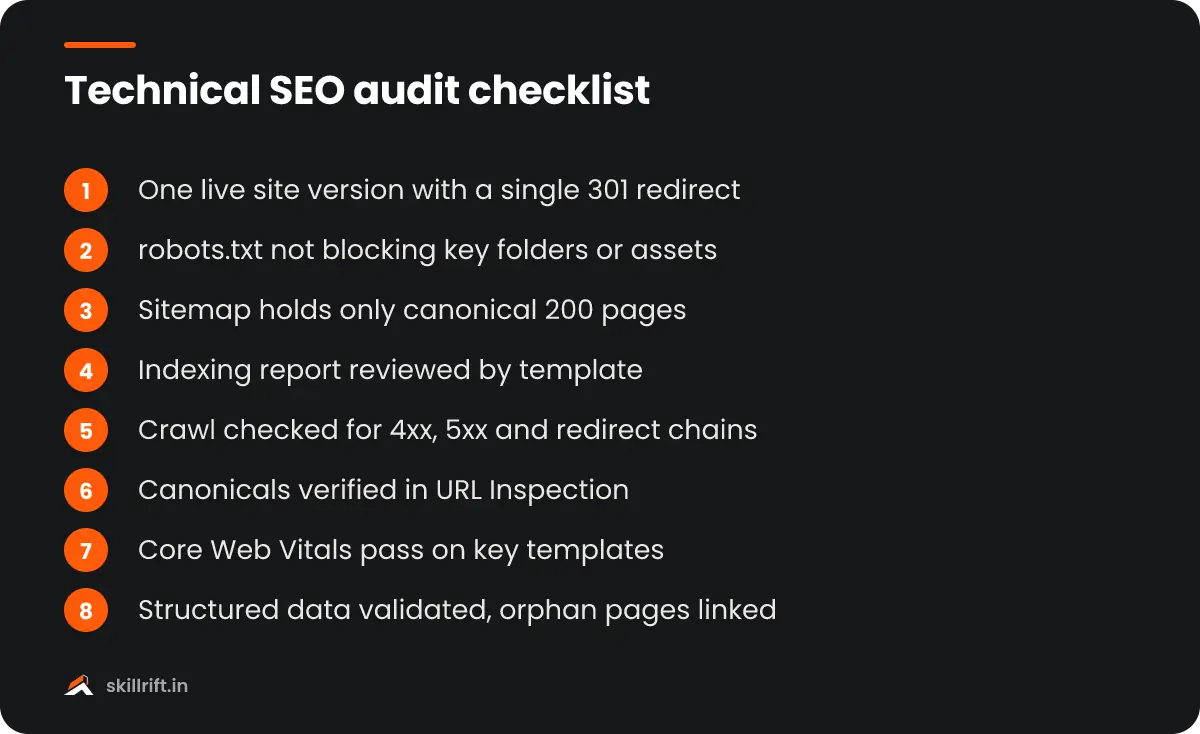
- Check that the right version of the site loads. Type the domain four ways: http, https, with www and without. All four should land on one version with a single 301 redirect. Two live versions split signals and create duplicates.
- Review robots.txt. Open yourdomain.com/robots.txt. Make sure it does not block important folders, CSS or JavaScript, and that it lists your sitemap. A leftover “Disallow: /” from a staging site is the single most damaging mistake you can find. Google’s robots.txt guide explains the syntax.
- Check the XML sitemap. Confirm it is submitted in Search Console and contains only canonical pages that return a 200 status. Redirected, noindexed or 404 URLs in a sitemap send mixed signals.
- Read the Page indexing report. In Search Console, open Indexing, then Pages. Compare indexed pages with what you expect. Look at the reasons for non-indexed pages and group them by template, not one URL at a time.
- Crawl the site. Run Screaming Frog on the full site. Export and review response codes (4xx and 5xx errors), redirect chains, missing or duplicate titles, missing meta descriptions and pages more than four clicks from the homepage.
- Check canonicals and duplicates. Every indexable page should have a self-referencing canonical, and duplicates should point to the main version. Then use URL Inspection on a few key pages to see which canonical Google actually selected.
- Test mobile rendering. Google indexes the mobile version of your pages. Use URL Inspection’s live test to view the rendered page and HTML. Make sure the main content, links and structured data appear on mobile, not only on desktop.
- Measure Core Web Vitals. Open the Core Web Vitals report in Search Console for real-user data, then test sample templates in PageSpeed Insights. Good scores are LCP of 2.5 seconds or less, INP of 200 milliseconds or less and CLS of 0.1 or less.
- Validate structured data. Run key templates such as product, article and local business pages through the Rich Results Test. Fix errors first; warnings for optional fields can wait.
- Check internal links and orphan pages. Compare URLs in your sitemap with URLs found in the crawl. Pages in the sitemap but not in the crawl are orphans with no internal links. Link them from relevant categories or remove them.
What to look for in the crawl export
Beginners often drown in crawler warnings. Focus on these columns first: status code, indexability, canonical link, title, H1 and crawl depth. Sort by each one and look for patterns. If 200 product pages all lack a meta description, that is one template fix, not 200 tasks.
How to read Core Web Vitals without panic
Search Console groups similar URLs together, so one failing group often means one slow template. On Indian sites, poor LCP usually comes from a large hero image or banner slider, and poor INP from heavy chat widgets, pop-ups and too many marketing tags firing on load.
How to prioritise what you find
Prioritise issues by how much traffic or revenue they affect and how hard they are to fix. A short list of high-impact fixes beats a 60-page report nobody reads.
| Priority | Typical issues | Action |
|---|---|---|
| Critical | Noindex or robots.txt blocks on key pages, site-wide 5xx errors, wrong canonicals on money pages | Fix within days |
| High | Redirect chains, duplicate category URLs, failing Core Web Vitals on product or service templates | Fix in the next sprint |
| Medium | Orphan pages, deep click depth, missing structured data | Plan within a month |
| Low | Missing alt text on blog images, long titles on old posts | Batch when convenient |
For each critical and high item, write a short developer ticket: what is wrong, three sample URLs, what correct behaviour looks like and how to test it. Developers act on clear tickets far faster than on screenshots of crawler dashboards.
Common technical issues on Indian websites
Most Indian small business and D2C sites run on WordPress or Shopify, and each platform has predictable problems.
WordPress sites
Expect too many plugins slowing the site, tag and author archives creating thin duplicate pages, and cheap shared hosting with slow server response. A local clinic in Pune or a coaching institute in Delhi often has 30 plugins where 10 would do. Removing unused plugins and adding a caching plugin plus image compression can fix most speed issues.
Shopify stores
Shopify creates product URLs under collections, such as /collections/kurtas/products/blue-kurta, alongside the main /products/blue-kurta URL. The theme adds a canonical to the main version, but some themes link internally to the collection version. Check your theme’s product links, and watch app scripts that add weight to every page.
Custom React or Next.js sites
Startups with custom builds sometimes render key content only in the browser. Use URL Inspection to confirm the product description, prices and links appear in the rendered HTML. If they do not, push for server-side rendering on those templates.
Small local businesses have a few extra checks, such as consistent NAP details and location pages. Our guide on SEO for small business covers those.
How to present your audit report
Present the audit as a one-page summary followed by a prioritised issue list. Decision-makers read the summary; developers read the tickets.
A simple structure works well:
- Summary: three to five sentences on site health and the biggest risks.
- Top five fixes: each with expected impact, owner and deadline.
- Full issue sheet: grouped by priority and template, with sample URLs.
- Baseline numbers: indexed pages, Core Web Vitals status and organic clicks from Search Console, so you can measure progress after fixes.
Re-crawl two to four weeks after fixes go live and compare against the baseline. That before-and-after comparison is what turns an audit into results, and it is also what builds trust with clients and managers.
Next steps after your first audit
Now that you know how to do a technical SEO audit, the fastest way to improve is repetition on different kinds of sites. Each platform teaches you new failure patterns.
- Audit your own site or a friend’s business site this week using the ten steps above.
- Audit one WordPress site and one Shopify store, and compare what you find.
- Set a monthly reminder to check Search Console’s indexing and Core Web Vitals reports.
- Save your best audit as a portfolio piece for job or freelance applications.
If you want guided practice on live sites with feedback from working practitioners, the SkillRift SEO course covers technical audits in depth, and the free masterclass is a good place to start.
If traffic fell in mid-November 2026, first read what Google’s November core update changed and what to do.
Once the site-wide issues are fixed, run each important page through our 20-point on-page SEO checklist.
Frequently asked questions
How long does it take to learn how to do a technical SEO audit?
Most beginners can run a useful basic audit after two to three weeks of practice on real sites. Reading reports in Search Console and a crawler takes a few days. Judging what matters and prioritising fixes takes longer, usually five to ten audits before it feels natural.
Can I do a technical audit with only free tools?
Yes. Google Search Console, PageSpeed Insights, the free version of Screaming Frog (up to 500 URLs), Bing Webmaster Tools and Ahrefs Webmaster Tools cover almost everything a small or medium site needs. Paid tools mainly save time on large sites with thousands of pages.
How often should a website get a technical SEO audit?
Run a full audit once or twice a year and a quick health check every month. Always audit before and after a redesign, platform change or domain migration, because that is when most serious problems, such as leftover noindex tags or broken redirects, appear.
How much do agencies in India charge for a technical SEO audit?
Pricing varies widely. Freelancers typically quote ₹5,000 to ₹25,000 for a small business site, while agencies often charge ₹30,000 to ₹1.5 lakh or more for large e-commerce sites. The price should reflect the number of templates and the depth of the report, not just page count.
What is the most common issue found in a technical audit?
On small Indian business sites, the most common issues are slow mobile loading from oversized images and plugins, duplicate URLs from tags or filters, and pages missing from the index because of weak internal linking. Accidental noindex tags after a redesign are less common but far more damaging.