How to Create a Google Business Profile That Ranks on Google Maps
A step-by-step guide to creating, verifying and optimising a Google Business Profile for Indian local businesses, from categories to reviews.

Here is how to create a Google Business Profile: sign in with a business Google account, go to business.google.com/create, add your exact business name, category, address or service area, phone and website, then verify ownership, usually by video. After verification, complete every field, add real photos and collect reviews so the profile can rank on Google Maps.
I have set up and fixed profiles for clinics, salons, coaching centres, restaurants and home-service businesses across India. Creating the listing takes 15 minutes. Ranking it in the local “map pack” depends on the choices you make during setup and the habits you build in the months after, so this guide covers both.
What you need before you start
You need a Google account the business controls, the legal or signboard name of the business, and a working phone number. Gather these first so the profile is accurate from day one.
- A business-owned Google account. Google recommends signing up with an email on your own domain. If you use Gmail, make it a business account, not a staff member’s personal one.
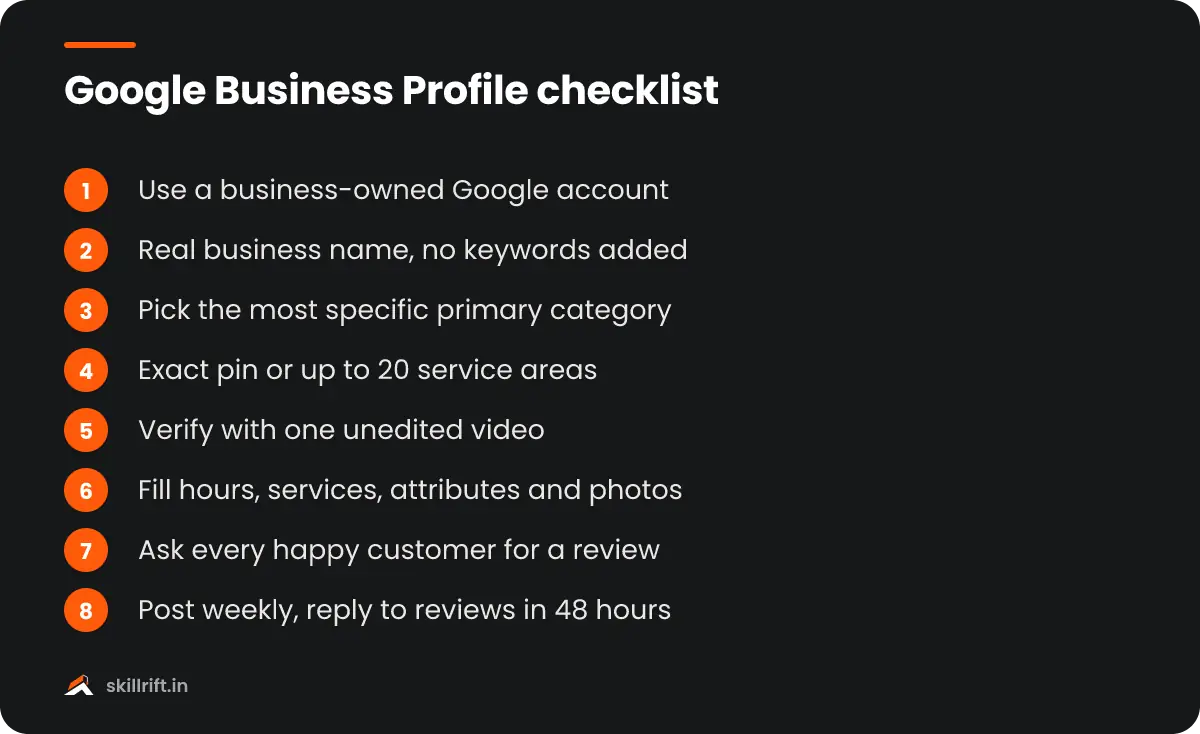
- Your real-world business name. Use the name on your signboard, invoice or GST registration. Adding keywords like “Best Dentist Pune” to the name breaks Google’s guidelines and is a common reason for suspension.
- Address or service area details. Decide whether customers visit you (a shop, clinic or office) or you visit them (a plumber, pest control or tutor).
- Phone number and website. A local mobile or landline number works. If you have no website yet, a single landing page or your Instagram profile is better than nothing.
- Proof for verification. Keep your signboard, shop interior, tools of the trade and a business document such as a GST certificate, shop licence or utility bill ready to show on camera.
Also search Google Maps for your business first. A listing may already exist, created by a customer or an old employee. In that case, claim it instead of making a new one.
How to create a Google Business Profile step by step
The setup flow asks for your details one screen at a time, and the whole process takes about 15 minutes before verification.
- Go to business.google.com/create while signed in to the business Google account.
- Enter your business name. If Google suggests a matching listing, select it. If it says the listing is already verified by someone else, use the option to request ownership.
- Choose your primary category. This is the most important ranking choice in the whole setup. Pick the most specific option, for example “Orthodontist” rather than “Dentist” if that is your main service. You can add secondary categories later.
- Say whether customers can visit you. If you have a staffed location, enter the address and place the map pin exactly on your entrance. If not, choose No.
- Add service areas if relevant. Google allows up to 20 service areas such as cities, localities or PIN codes. Its own advice is to stay within roughly two hours’ drive of your base.
- Add your phone number and website. Use a number that customers can actually reach during working hours.
- Click Finish and choose a verification option. Your profile will not appear publicly until verification is complete.
Google’s official help page on adding or claiming a Business Profile walks through the same flow if any screen looks different for you.
How verification works now
Most new profiles in India are now asked to verify with a short, unedited video, though Google decides which methods you see. Depending on your business type and history, you may also get phone, SMS or email options.
For a video verification, record one continuous clip of about one to two minutes. Show the street or a nearby landmark, then your signboard, then the inside of the business, then something that proves you manage it: unlocking the shutter, using the billing counter, or showing equipment and a business document. Service-area businesses can show a branded vehicle, tools and documents instead of a storefront.
Review usually takes a few business days. If the video is rejected, the common reasons are a missing signboard, a mismatch between the name on the profile and the name on the shop, or a cut-up video. Fix the cause before submitting again rather than retrying with the same clip.
Complete the profile so it can rank on Google Maps
A verified profile with blank fields rarely ranks. Google says local results are mainly based on relevance, distance and prominence, and a complete profile helps with the first and the third.
Business information
- Categories: one primary and a few genuinely relevant secondary categories. A cafe that also does takeaways and catering can add those.
- Hours: regular hours plus special hours for Diwali, Holi and other holidays. Wrong hours lead to angry one-star reviews faster than anything else.
- Description: up to 750 characters in plain language. Say what you do, where, and for whom. Do not include links or offers.
- Attributes: wheelchair access, women-led, online appointments, payment options such as UPI. These help customers and filter searches.
Services and products
Add each service with a short description and an indicative price in ₹ where it makes sense. A salon listing “Hair spa from ₹1,200” or a physiotherapy clinic listing “Home visit consultation” gives Google more relevant text to match against searches.
Photos and videos
Upload your logo, a cover photo, at least five exterior photos that show the entrance from the street, interior photos and photos of your team at work. Real photos taken on a phone beat stock images. Add a few new ones every month, because customers notice recent pictures.
Get reviews the right way
Reviews are the biggest lever you control for prominence. Aim for a steady flow of genuine reviews rather than a burst of fifty in one week.
- Copy your review link from the profile dashboard (“Ask for reviews”) and save it as a WhatsApp quick reply.
- Ask at the moment of satisfaction: when a patient says the pain is gone, or a customer thanks you at the counter.
- Put a QR code at the billing desk with a simple line such as “Happy with us? Tell others on Google.”
- Reply to every review within a couple of days, including negative ones. Thank the person, address the issue, and take details offline.
Never offer discounts or freebies in exchange for reviews, and never buy them. Google’s policies prohibit incentivised and fake reviews, and it removes them in bulk, sometimes along with restrictions on the profile.
Keep the profile active after setup
Ranking on Google Maps is not a one-time task. Profiles that are updated regularly tend to hold their position better than those that are left alone after setup.
| Task | How often | Why it matters |
|---|---|---|
| Post an update or offer | Weekly | Shows activity and gives customers a reason to click |
| Add new photos | Monthly | Keeps the listing current and trustworthy |
| Reply to reviews | Within 48 hours | Builds trust and shows you are responsive |
| Check hours and holidays | Before each festival | Avoids wasted visits and poor reviews |
| Review Performance insights | Monthly | Shows calls, direction requests and search terms |
| Check NAP consistency | Quarterly | Name, address and phone should match on Justdial, IndiaMART, your website and social pages |
Your website also helps. Put your full address and phone on the contact page, embed the map, and create a page for each main service. Our guide to SEO for small business websites explains how the site and profile support each other, and if you also promote locally on social media, see Instagram marketing for local businesses.
Common mistakes that hurt local rankings
Most profiles that fail to rank or get suspended make one of a handful of avoidable errors.
- Keyword stuffing the name. “Sharma Dental Clinic” is fine; “Sharma Dental Clinic Best Root Canal Delhi” is a guideline violation.
- Using a virtual office or co-working desk as the address when customers are not served there.
- Creating duplicate listings for the same location to cover more areas. Google advises one profile per location.
- Picking a broad category when a specific one exists.
- Changing the name, address or category often. Big edits can trigger re-verification.
- Ignoring the profile after verification. No reviews, no photos and outdated hours make it easy for competitors to outrank you.
Next steps
Now you know how to create a Google Business Profile, verify it and keep it active. This week, claim or create the listing, record your verification video, and fill in every field. Next month, focus on a steady stream of reviews and weekly updates, and check Performance insights to see which searches bring calls.
If you want to learn local SEO alongside website SEO with practical projects, take a look at the SkillRift SEO course, or join the free masterclass to see how we approach it.
Frequently asked questions
How to create a Google Business Profile without a shop address?
Choose No when Google asks whether customers can visit your location, then add up to 20 service areas such as cities, localities or PIN codes. Your address stays hidden from the public. This suits plumbers, tutors, pest control and other businesses that serve customers at their homes or offices.
Is a Google Business Profile free?
Yes. Creating, verifying and managing a Google Business Profile is completely free, and paying anyone does not improve your ranking on Maps. Be careful of callers who claim to be from Google and ask for money to verify or rank your listing. The only paid option is running Google Ads, which is separate.
How long does Google Business Profile verification take?
Video verification is usually reviewed within a few business days, although it can take longer when Google needs extra checks. Phone, SMS or email verification, when offered, is often instant. If your profile stays under review for more than a week, check the dashboard for messages or contact Google Business Profile support.
Why is my business not showing on Google Maps?
The most common reasons are that the profile is not yet verified, it is suspended for a guideline issue, or it is too new and has few reviews and photos. Distance matters too: searchers far from your location may not see you. Complete every field, earn reviews steadily and keep the information accurate.
Can I have one profile for multiple branches?
No. Each branch that serves customers in person should have its own profile with its own address, phone number and hours. Businesses with ten or more locations can use bulk verification. Do not create extra profiles for the same branch to cover more areas, as Google treats that as a duplicate.