What Is Schema Markup and How Do You Add It?
A plain guide to schema markup: what it does for SEO, which types still earn rich results after Google's cuts, a JSON-LD example for an Indian business, and six steps to add and test it.

Schema markup is code you add to a web page, usually as JSON-LD, that tells search engines exactly what the page is about: a product, an article, a local business, an event. You add it with a plugin like Rank Math or by pasting JSON-LD into the page, then test it in Google’s Rich Results Test.
What is schema markup?
It is a shared vocabulary from Schema.org that labels the things on your page so machines can read them without guessing. Google calls it structured data and uses it to understand pages and to show rich results such as product prices, star ratings and event dates.
Think of it as a fact sheet behind your page. A visitor sees “₹1,499, in stock, 4.5 stars”; schema tells Google that ₹1,499 is the price in INR, “in stock” is availability and 4.5 is the rating. Google’s introduction to structured data explains that it uses this markup to understand page content and to gather information about people, books and companies on the web.
Free playbook
Get the free SEO Playbook
A 25-page guide covering keyword research, content, on-page and technical SEO, Core Web Vitals, local SEO in India, link building, AI search and a 90-day plan. We email it to you, plus occasional new guides. Unsubscribe anytime.
Does schema markup help SEO?
Schema does not directly raise rankings, but it can make your result bigger and more clickable, and it helps search engines understand your page. The gain shows up in click-through rate, not position.
Google’s own case studies give a sense of the upside. On the same structured data page, Google reports that Rotten Tomatoes measured a 25% higher click-through rate on pages with structured data, and Nestlé measured an 82% higher click-through rate for pages shown as rich results. Those are big brands, so treat them as what is possible, not a promise.
What is the difference between schema markup and rich results?
The markup is the code; a rich result is the enhanced listing Google may show because of it. Valid markup makes a page eligible, but Google decides whether to show the rich result.
Which schema markup types should you use?
Use the types that match what the page really is, starting with Organization, Article or Product, and LocalBusiness if you have a shop or office. Google’s search gallery lists every type it supports for rich results.
| Your site or page | Schema type | What it can show in Google | Example in India |
|---|---|---|---|
| Blog post or news article | Article / BlogPosting | Better title, image and date understanding | A marketing blog, a news site |
| Online store product | Product with Offer | Price in ₹, availability, ratings, shipping | A D2C skincare brand |
| Shop, clinic or office | LocalBusiness | Address, hours, phone, map details | A dental clinic in Pune |
| Course or coaching | Organization and Course | Brand details (Google is phasing out Course Info rich results) | A coaching institute |
| Recipe | Recipe | Image, cook time, ratings | A regional food blog |
| Event or webinar | Event | Date, venue, online or offline | A college fest, a workshop |
| Video page | VideoObject | Thumbnail, duration, key moments | A YouTube tutorial embedded on your site |
| Whole site | Organization and WebSite | Logo, site name, knowledge panel details | Every business website |
| Any page with a trail | BreadcrumbList | Breadcrumb path instead of a raw URL | Category and blog pages |
Which schema types has Google stopped showing?
Google has cut several rich results, so don’t add markup expecting a feature that no longer appears. In 2023 it limited FAQ rich results and removed How-to rich results, and in 2025 it began phasing out seven more types.
Google’s June 2025 announcement lists Book Actions, Course Info, Claim Review, Estimated Salary, Learning Video, Special Announcement and Vehicle Listing. Google said this won’t affect rankings, and the markup still works outside Google Search. The 2023 change came from Google Search Advocate John Mueller:
Going forward, FAQ (from FAQPage structured data) rich results will only be shown for well-known, authoritative government and health websites.
John Mueller, Search Advocate, Google, Google Search Central Blog
The same post says there is no need to remove FAQ markup you already have. It still describes your page to other search engines and tools.
What is JSON-LD and why is it recommended?
JSON-LD is a block of JavaScript-style data placed in the page’s HTML, separate from the visible content. Google supports JSON-LD, Microdata and RDFa equally, but recommends JSON-LD because it’s the easiest to add and maintain.
Here is a LocalBusiness example for a made-up Indian clinic. Swap in your own details and wrap it in a script tag with type=”application/ld+json”:
{
  "@context": "https://schema.org",
  "@type": "Dentist",
  "name": "Smile Dental Clinic",
  "url": "https://example.in/",
  "telephone": "+91-20-0000-0000",
  "priceRange": "₹₹",
  "address": {
    "@type": "PostalAddress",
    "streetAddress": "12 FC Road",
    "addressLocality": "Pune",
    "addressRegion": "Maharashtra",
    "postalCode": "411004",
    "addressCountry": "IN"
  },
  "openingHours": "Mo-Sa 10:00-20:00"
}
Use “IN” for the country and the +91 format for phone numbers. For products, set “priceCurrency” to “INR” so Google shows rupees, not a converted amount.
How to add schema markup to your site
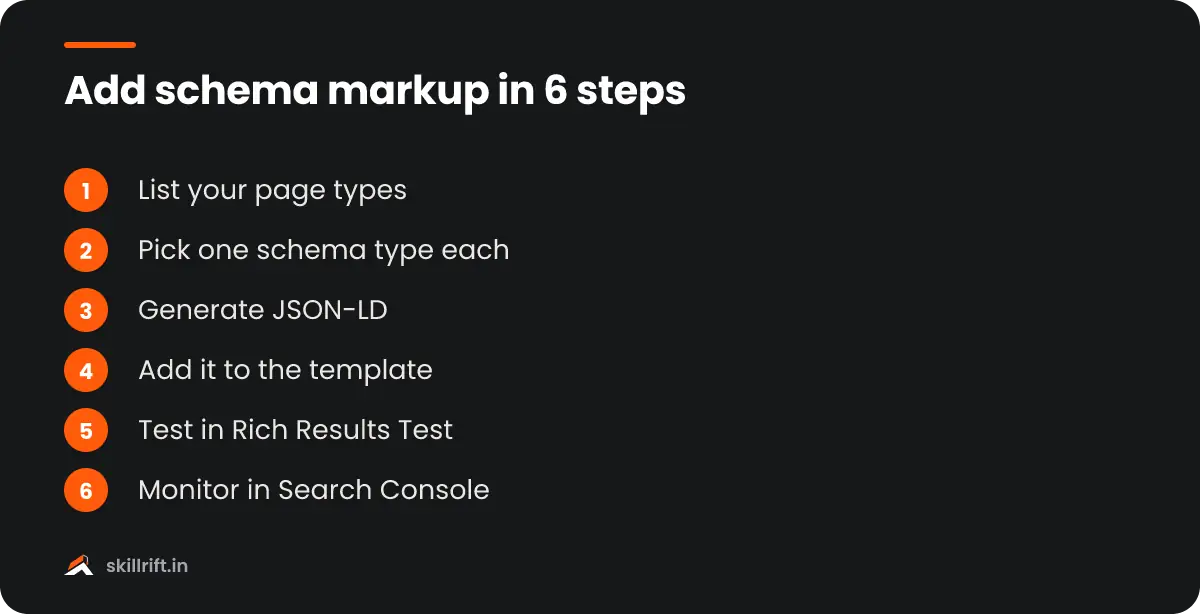
You mark up page types, not every page by hand, so the work is smaller than it looks. Work through these steps.
Step 1: List your page types
Write down the kinds of pages you have: home, blog post, product, category, location and contact. Each page type gets one main schema type.
Step 2: Pick the right schema type for each
Match each page type to a type from the table above, and check Google’s documentation for its required and recommended properties. Use the most specific type, such as Dentist instead of LocalBusiness.
Step 3: Generate the JSON-LD
Use a plugin, your platform’s built-in schema, or a free generator to create the code. Fill every required property with real details from the page.
Step 4: Add it to the page template
Place the JSON-LD in the page’s HTML, in the head or body, so it loads on every page of that type. On WordPress, a plugin does this for you.
Step 5: Test with the Rich Results Test
Paste the URL into Google’s Rich Results Test and fix every error before you publish. Use the Schema Markup Validator to check types Google doesn’t show as rich results.
Step 6: Monitor in Search Console
After Google recrawls, open the Enhancements reports in Search Console to see valid items, warnings and errors across the whole site. Recheck after theme or plugin updates, which often break markup.
How do you add schema markup in WordPress?
The simplest way is an SEO plugin such as Rank Math, Yoast or All in One SEO, which adds Article, Organization and breadcrumb schema automatically. You then pick a schema type per post in the plugin’s settings.
For WooCommerce stores (and if you run a local shop, pair this with a complete Google Business Profile), the shop and SEO plugin together output Product schema with price and stock. Check that the currency is INR and that prices match what shoppers see, including GST if you show it.
How do you test schema markup?
Use Google’s Rich Results Test for features Google supports, and the Schema Markup Validator for everything else. Test both the live URL and the code snippet, because a theme or caching plugin can change what Google actually sees.
Does schema markup help with AI Overviews and ChatGPT?
Structured data isn’t required to appear in Google’s AI features, but it helps machines read your facts correctly. Google’s guide to AI features and your website says there are no additional requirements to appear in AI Overviews or AI Mode, and that you don’t need special markup or AI text files.
The same guide lists making sure structured data matches the visible text on the page as one of the SEO basics that still matter. So treat schema as clean data for every system that reads your site, not a trick for AI. Our guide to AI Overviews SEO covers what actually earns citations.
Our Take
We’d keep schema simple and accurate. Every site needs Organization, WebSite and BreadcrumbList; then add Article on posts, Product on product pages and LocalBusiness if customers visit you. Skip types Google no longer shows unless another tool needs them. And never mark up anything a visitor can’t see on the page, because that’s how sites get manual actions.
What are the common mistakes with schema markup?
Most schema problems are about accuracy, not code. Watch for these:
- Marking up content that isn’t visible on the page, such as fake reviews or hidden FAQs.
- Adding review stars to your own business’s homepage; self-serving reviews aren’t eligible for stars.
- Running two plugins that both output schema, which creates duplicate or conflicting markup.
- Using USD or a missing currency on Indian product pages instead of INR.
- Forgetting to update prices, stock or opening hours in schema when they change on the page.
- Adding markup for retired features and expecting them to show up.
- Never testing after a theme, plugin or site migration.
Structured data is one item in a full page review. Our on-page SEO checklist and our guide on how to do a technical SEO audit show where it fits.
Key takeaway: schema won’t lift rankings on its own, but accurate JSON-LD for the right types makes your pages eligible for richer results and easier for every search engine to understand. Start with Organization, Article or Product and LocalBusiness, test every template, and keep it matching the page.
If you want to learn schema, technical SEO and content together with live projects, see SkillRift’s SEO course.
Frequently asked questions
Is schema markup a ranking factor?
Not directly. Google uses schema to understand pages and to show rich results, which can raise click-through rate. Good content and links still decide rankings.
Do I need coding skills to add schema markup?
No. On WordPress, plugins like Rank Math or Yoast add the main types for you. For custom pages, free generators create the JSON-LD, and you paste it into the page and test it.
Should I remove FAQ schema now that Google rarely shows it?
No need. Google said in 2023 that sites don’t have to remove FAQPage markup. It still describes your content to other search engines and tools, but don’t expect FAQ rich results unless you’re a well-known government or health site.