How to Do Conversion Rate Optimization: 15 Landing Page Fixes
A 6-step CRO process, 15 landing page fixes ranked from quickest to slowest, free tools and a rupee example showing what a small conversion lift is worth.
To do conversion rate optimization, measure where visitors drop off, find out why with recordings and surveys, then fix and test one change at a time. Most quick wins sit on the landing page: a clearer headline, a faster mobile load, fewer form fields, visible trust signals and payment options Indian buyers expect, such as UPI and cash on delivery.
This guide gives you a 6-step CRO process, 15 landing page fixes ranked by effort and a worked rupee example, so you can see what a small lift is worth before you spend a rupee more on ads.
What is conversion rate optimization?
Conversion rate optimization (CRO) is the practice of increasing the share of visitors who take the action you want, such as buying, filling a form or messaging you on WhatsApp. You get more results from the traffic you already pay for.
A “conversion” is whatever the page exists to do. For an online store it is a purchase; for a coaching institute it may be a counselling-call booking; for a B2B service it is a demo request. Write that one goal down before you change anything.
How do you calculate conversion rate?
Divide conversions by visitors (or sessions) and multiply by 100. If 4,000 people visit your landing page and 120 submit the form, your conversion rate is 120 ÷ 4,000 × 100 = 3%.
Use the same definition every time. Sessions and users give different numbers in Google Analytics 4, and comparing one against the other makes a page look better or worse than it is.
What is a good conversion rate in India?
There is no single good number, because rates swing by industry, device and traffic source. As a reference, Unbounce’s benchmark report puts the median landing page conversion rate at 6.6% across all industries.
That figure comes from the Unbounce Conversion Benchmark Report, based on more than 41,000 landing pages. Treat it as a rough marker, not a target. Your own last 90 days are the benchmark that matters, and the goal is to beat them.
Free playbook
Get the free Analytics, GA4 and CRO Playbook
A 25-page guide covering GA4 setup, Tag Manager, UTMs, attribution, Looker Studio dashboards, heatmaps, A/B testing and landing page fixes. We email it to you, plus occasional new guides. Unsubscribe anytime.
Why does conversion rate optimization matter more than buying more traffic?
Because a better conversion rate lowers the cost of every lead or sale, from every channel, at once. More traffic costs money every month; a better page keeps paying back.
Example (illustrative numbers): a store gets 10,000 visits a month, converts 2% and has an average order value of ₹1,200. That is 200 orders and ₹2,40,000 in revenue. Lift the rate to 2.5% and you get 250 orders and ₹3,00,000, an extra ₹60,000 a month from the same ad spend.
| Conversion rate | Orders (10,000 visits) | Revenue at ₹1,200 AOV | Cost per order at ₹50,000 ad spend |
|---|---|---|---|
| 2.0% | 200 | ₹2,40,000 | ₹250 |
| 2.5% | 250 | ₹3,00,000 | ₹200 |
| 3.0% | 300 | ₹3,60,000 | ₹167 |
The last column is why paid marketers care so much. Cheaper orders mean you can bid higher and still make money, which also improves your ROAS.
How to do conversion rate optimization in 6 steps
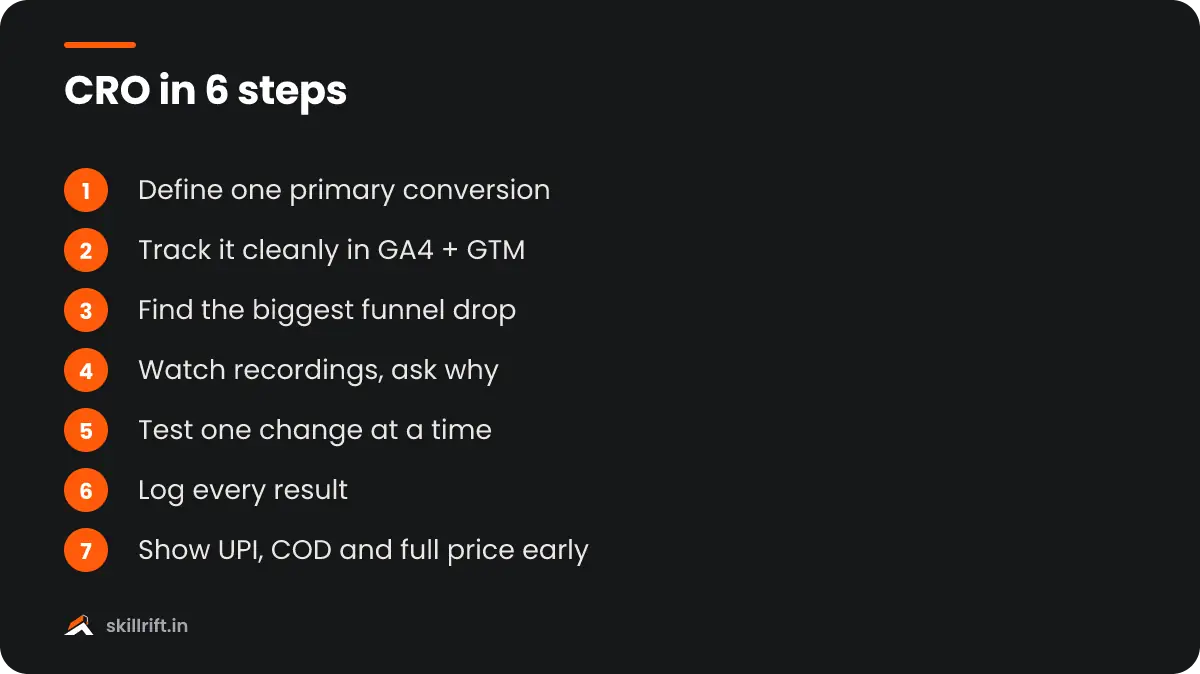
Work in a loop: set the goal, measure, research, form a hypothesis, test, then keep or roll back. Skipping research and jumping straight to changes is the most common reason CRO work fails.
Step 1: Define one primary conversion
Pick the single action that matters most on the page and track it as a key event in GA4. Secondary actions, such as a phone click, can be tracked too, but judge the page on the primary one.
Step 2: Set up clean tracking
Fire events for form submits, checkout steps and WhatsApp clicks through Google Tag Manager. Our guides on setting up GA4 and setting up Google Tag Manager walk you through both.
Step 3: Find where visitors drop off
Build a funnel exploration in GA4: landing page, product or form view, start, submit. The step with the biggest drop is where you start. If you are unsure how the stages fit together, read what a marketing funnel is.
Step 4: Watch and ask why
Use session recordings and heatmaps to see rage clicks, dead zones and form fields people abandon. Add a one-question exit survey, such as “What stopped you from booking today?”, to hear it in their words.
Step 5: Write a hypothesis and test it
Use the format: because we saw X, changing Y will improve Z. Then run an A/B test if you have the volume, or a before-and-after comparison if you don’t.
Step 6: Keep, roll back and record
Ship winners, undo losers and log every test in a simple sheet with the date, change, result and what you learned. The log stops your team from re-testing the same idea six months later.
Which 15 landing page fixes lift conversions?
Start with the fixes that remove friction or doubt, because they help almost every page. They are grouped below from quickest to slowest to ship.
1. Make the headline say what you offer
A visitor should know what you sell, for whom and why it is better within a few seconds. Swap clever slogans for plain words that match the ad or search query that brought them.
2. Match the page to the ad
If the ad promises “Free demo class”, the page must show that same offer above the fold. A mismatch feels like a bait and switch and sends paid clicks straight back.
3. Write simpler copy
Short words and short sentences convert better. Unbounce found that pages written at a 5th to 7th grade reading level convert at 11.1%, well above pages written in professional-level language (Unbounce).
4. Use one clear call to action
Give the page one main button with a verb and a benefit, such as “Book my free call”. Extra links to your blog, social profiles and menu pull attention away from it.
5. Fix mobile load speed
Compress images, serve WebP, cut unused scripts and test on PageSpeed Insights with a mid-range Android phone in mind. In Unbounce’s sample, 83% of landing page visits came from mobile devices.
6. Cut form fields
Ask only for what you need to follow up: often name and phone number. Every extra field, such as company size or city, is one more reason to quit.
7. Offer guest checkout and OTP login
Forced account creation is a known checkout killer. In Baymard Institute’s survey, 18% of shoppers who abandoned checkout said the site wanted them to create an account (Baymard). Mobile OTP login is the familiar fix in India.
8. Show the full price early
Show delivery charges and GST-inclusive prices before the final step. In the same Baymard data, extra costs such as shipping, tax and fees were the top reason for abandonment, at 40%.
9. Show UPI and cash on delivery
Display the payment options Indian buyers look for, such as UPI apps, cards, EMI and cash on delivery, with their logos near the buy button. Not seeing a preferred option is a quiet reason to leave.
10. Add a WhatsApp button
A click-to-chat button gives hesitant buyers a way to ask one question before they commit. Track it as a conversion in GTM so you can see its real value.
11. Show delivery dates by PIN code
Let visitors check delivery time for their PIN code on the product page. “Delivered by Thursday” answers a doubt that a generic “5–7 days” leaves open.
12. Add proof near the button
Place reviews, ratings, student results you can verify or client logos right next to the call to action, not at the bottom of the page. Real names and photos beat anonymous praise.
13. Show trust details
Show a phone number, physical address, GST number, return policy and secure-payment badges. These matter more for new brands that buyers have never heard of.
14. Offer a Hindi or regional-language version
If a large share of your traffic comes from Tier 2 and Tier 3 cities, test a Hindi or regional-language landing page. Keep the same offer and design so the language is the only change.
15. Answer objections with an FAQ
List the five questions your sales team hears most, such as refund terms, batch timings or warranty, and answer them on the page. Keep the answers visible, not hidden in accordions.
Which CRO tools can you use for free in India?
You can run a full beginner CRO programme on free tools. Paid testing platforms help later, once you have the traffic to run many tests.
| Tool | What it does | Cost |
|---|---|---|
| Google Analytics 4 | Funnels, key events, landing page reports | Free |
| Google Tag Manager | Tracks clicks, forms and scrolls without code changes | Free |
| Microsoft Clarity | Heatmaps and session recordings | Free |
| PageSpeed Insights | Mobile and desktop speed scores with fixes | Free |
| Looker Studio | Dashboards that combine GA4 and ad data | Free |
Google Optimize no longer exists, so free A/B testing now means a paid tool’s free plan, your landing page builder’s split-test feature, or careful before-and-after tests. Our Google Analytics 4 course covers funnel reports and event tracking in depth.
How long should you run an A/B test?
Run every test for at least one full week, and ideally two, so you capture weekday and weekend behaviour. Stop only when you reach the sample size you planned, not the first day the result looks good.
Plan the sample size before you start with any free A/B test calculator. Peeking and stopping early is how teams “win” tests that later turn out to be noise. Big sale days such as Diwali or Big Billion Days distort behaviour, so avoid starting or ending a test around them.
“The conversion rate can be a short-sighted metric. If you’re only focused on the conversion rate, you might be sacrificing long-term metrics like Lifetime Value.”
Peep Laja, founder of CXL and Wynter, on the Yes, and Marketing podcast (Verblio)
Keep that warning in mind. A popup that doubles sign-ups but fills your list with people who never open an email is not a win. Track lead quality or repeat purchase alongside the headline rate.
Our Take
Start with your checkout or form, not your homepage. In a typical Indian funnel, the biggest leaks tend to be a surprise delivery charge, a missing COD or UPI option, or a form that asks for too much. Fix those three, watch twenty session recordings, and only then think about testing headlines or button colours.
If you are a beginner, don’t buy a testing tool in month one. GA4, Clarity and a spreadsheet log will teach you more about your visitors than any paid platform.
Common mistakes in conversion rate optimization
Most failed CRO work comes from testing without research, ending tests too early or chasing the wrong number.
- Copying “best practices” blindly. A green button won for someone else’s audience, not yours. Test it on your own traffic.
- Testing several changes at once. If the headline, image and form all change together, you won’t know which one worked.
- Stopping tests early. A result after two days of traffic is usually noise.
- Ignoring mobile. Reviewing pages only on a desktop monitor hides the problems most of your visitors see.
- Counting the wrong conversion. For COD stores, an order placed is not an order delivered. Optimise for delivered orders where you can.
For ideas on what to test first, Semrush’s CRO guide has a good list of research questions, and Baymard’s data shows where checkouts lose people.
Key takeaway: Conversion rate optimization is a loop of measure, research, test and learn. Fix friction on the form or checkout first, show Indian buyers the prices and payment options they expect, and judge every change on lead quality and revenue, not the headline rate alone.
Frequently asked questions
Is conversion rate optimization only for ecommerce sites?
No. Any page with a goal can be optimised: a lead form for a coaching institute, a demo request for a SaaS tool, a WhatsApp enquiry for a clinic or a newsletter sign-up for a blog. The method is the same: measure the goal, find the drop-off, test a fix.
How much traffic do I need before I start A/B testing?
You need enough conversions, not just visitors, for a test to reach a clear result. If a page gets only a handful of conversions a week, skip split tests and make research-backed fixes one at a time, comparing a few weeks before and after.
Which free tools are enough to start CRO in India?
Google Analytics 4 for funnels, Microsoft Clarity for heatmaps and session recordings, PageSpeed Insights for speed and Google Tag Manager for event tracking. All four are free and cover most of what a beginner needs.