How to Set Up Meta Advantage+ Campaigns: Guide for Indian Businesses
A 7-step setup for Meta Advantage+ Sales and Leads campaigns, with rupee budget examples, the three levers that keep Advantage+ on, and when to switch to manual.

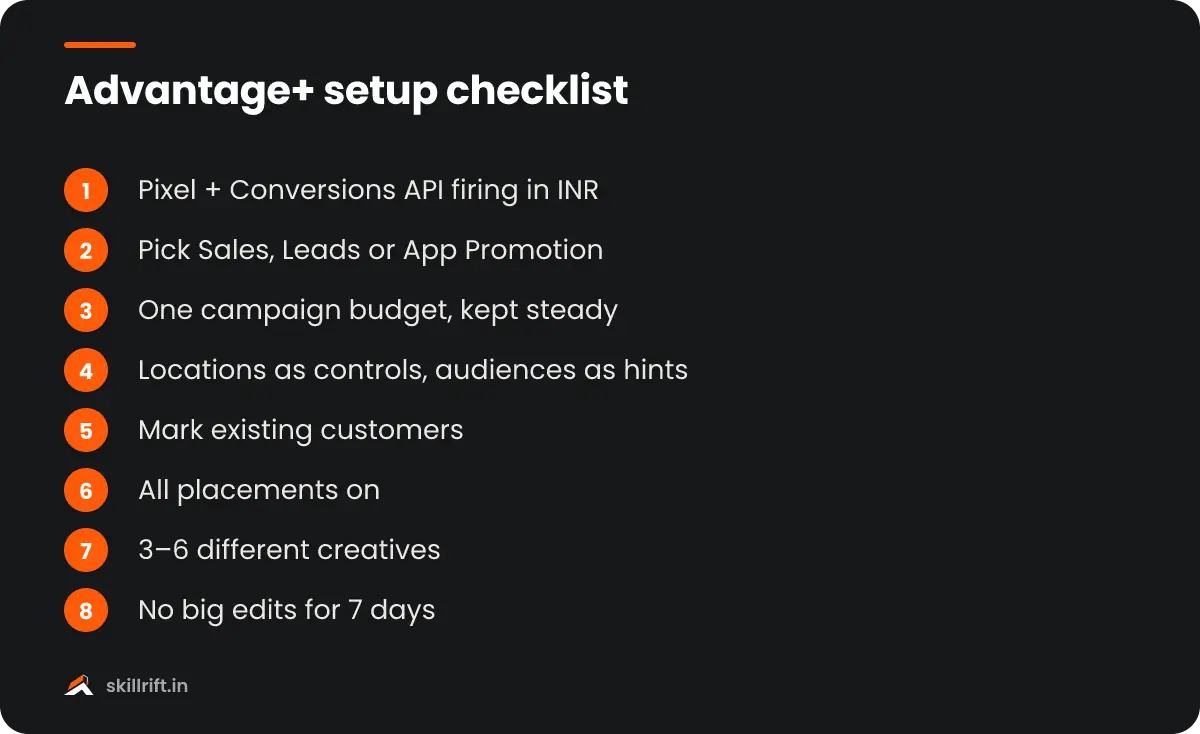
To set up Meta Advantage+ campaigns, create a new campaign in Ads Manager, choose Sales, Leads or App Promotion, and keep the three Advantage+ defaults on: campaign budget, audience and placements. Then add a working Pixel and Conversions API, upload 3–6 strong creatives and give the campaign a week to learn before you judge it.
What are Meta Advantage+ campaigns?
Meta Advantage+ campaigns are campaigns where Meta’s AI decides who sees your ads, where they appear and how the budget is split, within the limits you set. You supply the goal, the budget, the creatives and a few hard rules such as location.
Meta calls Advantage+ a set of AI and automation products. The “end-to-end” versions are full campaigns for sales, app installs and leads; the “single-step” tools, such as Advantage+ audience or placements, automate one part of a campaign you otherwise control.
What happened to Advantage+ Shopping campaigns?
They are now Advantage+ Sales campaigns. Meta folded the separate Shopping flow into the normal campaign setup, so there is no longer a “manual or Advantage+” choice at the start.
As AdLibrary puts it, the merge did not remove campaign decisions; it switched them on by default. Old guides that tell you to pick “Advantage+ Shopping Campaign” from a menu are out of date.
Free playbook
Get the free Meta Ads Playbook
A 25-page guide covering business setup, Pixel and Conversions API, campaign structure, creative, testing, lead and WhatsApp ads, scaling and templates. We email it to you, plus occasional new guides. Unsubscribe anytime.
Which objectives and settings make a campaign Advantage+?
Advantage+ campaign setup works with three objectives: Sales, Leads and App Promotion. A campaign stays Advantage+ as long as three levers stay on, and Ads Manager warns you when an edit switches it off.
| Lever | Default | What turns Advantage+ off |
|---|---|---|
| Advantage+ campaign budget | On | Choosing ad set budgets with more than one ad set |
| Advantage+ audience | On, with your audiences as suggestions | Restricting targeting and unticking suggestions |
| Advantage+ placements | On | Most manual placement edits, such as removing Threads or limiting devices |
This breakdown follows Jon Loomer’s walkthrough of Advantage+ campaign creation. Hard limits such as location, minimum age, language and excluded custom audiences are “controls” and do not switch Advantage+ off.
What do you need before you start?
You need clean conversion tracking, enough budget for the campaign to learn and a handful of different creatives. Without the first, the AI optimises toward the wrong people.
- Pixel plus Conversions API firing a Purchase or Lead event with value and currency (INR). Test it in Events Manager first.
- A product catalogue if you sell online, so you can run catalogue ads inside the Sales campaign.
- A customer list (hashed emails or phone numbers) so you can define existing customers.
- 3–6 creatives in different formats: a Reel, a static image, a carousel and a UGC-style video.
- A budget you can hold steady for at least 7 days.
If you run a cash-on-delivery store, decide now whether “Purchase” means order placed or order delivered. Many Indian brands send the purchase event at order time, which teaches Meta to find people who order but refuse delivery. Our guide to calculating ROAS explains why delivered revenue is the number that matters.
How to set up Meta Advantage+ campaigns step by step
The setup takes about 15 minutes once tracking works. These steps use the Sales objective; Leads and App Promotion follow the same pattern.
Step 1: Create a campaign and choose Sales
In Ads Manager, click Create and pick Sales (or Leads for enquiries). Advantage+ setup is applied automatically; you will see a label confirming it is on.
Step 2: Set the conversion location and event
Choose Website (or Website and app), select your Pixel and the Purchase event. For lead generation, choose Instant forms or your website’s Lead event.
Step 3: Set one campaign budget
Keep Advantage+ campaign budget on and enter a daily budget. Bid strategy and any cost-per-result goal now sit at campaign level, so leave the bid strategy on highest volume for the first test.
Step 4: Add location controls and audience suggestions
Set the cities or states you actually deliver to as a control. Add your lookalikes or interests only as suggestions, which Meta can go beyond if it finds better buyers.
Step 5: Define existing customers
Upload your customer list as a custom audience and mark it as existing customers in the account settings. This lets you see, and later limit, how much spend goes to people who would have bought anyway.
Step 6: Leave placements on Advantage+
Keep all placements on: Feed, Reels, Stories, Explore, Threads and Audience Network. Use brand-safety settings to block content you must avoid instead of removing placements.
Step 7: Upload 3–6 different creatives and publish
Each ad set can hold up to 50 ads, but Meta discourages more than six. Make each creative a genuinely different angle, such as price, proof, problem and founder story, not six colour versions of one image.
How much budget do Advantage+ campaigns need in India?
Work backwards from your cost per purchase. Meta’s peak-season guidance, as reported by PPC Land, points to about 50 conversions a week for an ad set to leave the learning phase, so your weekly budget should cover roughly 50 times your expected cost per result.
| Expected cost per result | Weekly budget for ~50 results | Daily budget |
|---|---|---|
| ₹150 (lead) | ₹7,500 | About ₹1,070 |
| ₹400 (low-ticket purchase) | ₹20,000 | About ₹2,860 |
| ₹1,000 (higher-ticket purchase) | ₹50,000 | About ₹7,140 |
These are worked examples, not benchmarks; use your own cost per result from past campaigns. If you can’t afford 50 purchases a week, optimise for a higher-volume event such as Add to cart or Initiate checkout until you can.
Are Advantage+ campaigns better than manual campaigns?
Often, yes, if tracking is clean and you feed them enough creative. Meta’s own figures are favourable, but they are averages, so test against your current setup rather than trusting them blindly.
On its Advantage+ product page, Meta reports a 20% lower cost per action for advertisers using Advantage+ sales campaigns, and a 10% lower cost per qualified lead with Advantage+ leads campaigns. These are Meta’s numbers from its own studies.
Turning Advantage+ off should be the exception, not the rule.
Jon Loomer, Meta advertising consultant, in Advantage+ Campaign Creation: A Complete Guide
When should you turn Advantage+ off?
Turn it off only when you have a hard business rule the AI can’t follow, backed by recent data. Common cases in India are below.
- Strict serviceable areas. A local clinic or real-estate project can usually handle this with location controls; go manual only if you need different budgets per city.
- Separate budgets by audience. For example, a fixed spend for retargeting cart abandoners during a sale.
- Regulated categories such as finance, where you need tight control over who sees the ad.
- Very low conversion volume, where the AI has too little data to learn from.
Our Take
Fix the event before you touch the campaign. When Advantage+ “doesn’t work”, the cause is very often a Purchase event that counts COD orders that never get delivered, or a lead form that attracts junk numbers. Send Meta the signal you actually want more of, then give one campaign a full week and a fixed budget before you make any changes.
Common mistakes with Advantage+ campaigns
Most problems come from feeding the system poor inputs or editing it too often, not from the automation itself.
- Editing daily. Big budget or creative changes restart learning. Change budgets by small steps, a few days apart.
- Too few creatives. One or two ads leave the AI nothing to test.
- Ignoring existing-customer spend. High reported ROAS can just mean Meta is retargeting your buyers.
- Judging on Ads Manager alone. Compare with backend orders, especially after Meta’s tracking changes.
- Cutting placements by habit. Removing Audience Network or Threads switches Advantage+ off and often raises costs.
Key takeaway: Meta Advantage+ campaigns work best with clean conversion tracking, a budget that buys about 50 results a week, 3–6 distinct creatives and a week without edits. Keep the defaults on unless you have a clear, data-backed reason to switch one off.
New to Meta ads? Start with how to learn Meta Ads, and practise answering the questions in our Meta Ads interview guide. The SkillRift performance marketing course covers Advantage+, tracking and budgeting with live Indian campaigns.
Frequently asked questions
Can I still create a manual campaign on Meta?
Yes. You start in the same flow and switch off a lever, such as choosing ad set budgets for several ad sets or restricting the audience. Ads Manager then tells you the campaign is no longer Advantage+.
Do Advantage+ campaigns work for lead generation?
Yes. Advantage+ setup supports the Leads objective. Optimise for qualified leads where possible, using conversion leads or CRM events, so Meta learns from good enquiries rather than every form fill.
Advantage+ learns from your conversion data, so first set up the Meta Conversions API to send clean events.
How long does an Advantage+ campaign take to learn?
Plan for at least 7 days. Meta’s guidance is about 50 conversions a week to exit the learning phase, so low-budget accounts can take longer. Avoid big edits during this period.