How to Set Up Meta Conversions API and the Pixel
A plain seven-step guide to setting up the Meta Conversions API with the Pixel, choosing a method, deduplicating events, improving Event Match Quality and tracking COD and WhatsApp sales in India.
To set up the Meta Conversions API, connect your website or server to your Meta Pixel in Events Manager, send the same events from both the browser and the server with a shared event ID, and confirm deduplication in Test Events. Most Indian small businesses can do this without code through Meta’s one-click setup or their store platform’s official Meta integration.
What is the Meta Conversions API?
The Meta Conversions API (CAPI) sends conversion events, such as leads and purchases, from your server to Meta instead of from the visitor’s browser. Meta uses those events to measure results, optimise delivery and build audiences, the same way it uses Pixel events.
Meta’s Conversions API documentation describes it as a connection between an advertiser’s marketing data, from servers, websites, apps or CRMs, and Meta. Server events are tied to the same dataset ID as your Pixel, so you see both in one place in Events Manager.
The reason it matters is data loss. Ad blockers, browser privacy settings and slow mobile connections stop some Pixel events from ever reaching Meta. Your server doesn’t have those problems, because it knows an order happened whether or not the browser reported it.
How is the Conversions API different from the Meta Pixel?
The Pixel is code in the visitor’s browser and CAPI is a connection from your server. They send the same kind of events through different routes, which is why Meta wants both.
| Meta Pixel | Conversions API | |
|---|---|---|
| Where it runs | Visitor’s browser | Your server, store platform or CRM |
| Affected by ad blockers | Yes | No |
| Can send offline events (COD, phone, WhatsApp sales) | No | Yes |
| Setup effort | Paste a code snippet or install a plugin | One-click, plugin, gateway or developer build |
| Best used | Together with CAPI | Together with the Pixel |
Free playbook
Get the free Meta Ads Playbook
A 25-page guide covering business setup, Pixel and Conversions API, campaign structure, creative, testing, lead and WhatsApp ads, scaling and templates. We email it to you, plus occasional new guides. Unsubscribe anytime.
Do you still need the Meta Pixel if you use CAPI?
Yes. Meta’s best-practice guidance is to use the Conversions API in addition to the Pixel and share the same events through both tools.
Meta calls this a redundant setup. In its deduplication guide it says it recommends that advertisers implement the Conversions API alongside their Meta Pixel. The browser catches signals like the click ID and cookie, and the server fills the gaps the browser leaves.
The payoff can be real. Meta’s April 2026 announcement says advertisers with a Conversions API setup for web events saw an average 17.8% lower cost per result compared with those without one. That is Meta’s own average across advertisers, not a promise for your account, but it explains why Meta keeps pushing CAPI.
Which Conversions API setup method should you choose?
Pick the simplest method that sends all your important events. For most small Indian businesses that means Meta’s one-click setup or the official Meta app or plugin for their store platform.
| Method | Best for | Technical skill | What to know |
|---|---|---|---|
| Meta-enabled (one-click) in Events Manager | Small sites that already have the Pixel | None | Meta runs the server side; fewest options to customise |
| Store platform integration (Shopify, WooCommerce and others) | Online stores | Low | Use the official Meta app or plugin and turn on its server-side or maximum data-sharing option |
| Conversions API Gateway | Businesses with a cloud account and some IT help | Medium | You host it in your own cloud, so hosting is billed by your provider |
| Server-side Google Tag Manager | Teams already using GTM | Medium to high | Flexible; needs a server container and a hosting service |
| Direct API build | Custom sites, apps, CRMs, lead systems | High | Full control, including offline and CRM events |
If you already manage tags in Google Tag Manager, read our Google Tag Manager setup guide first, because the server-side route builds on the same container logic.
a one-click option that requires no technical expertise, no costs, no ongoing maintenance
Meta, describing its Meta-enabled Conversions API setup in its Pixel and Conversions API update (15 April 2026)
How to set up Meta Conversions API and the Pixel step by step
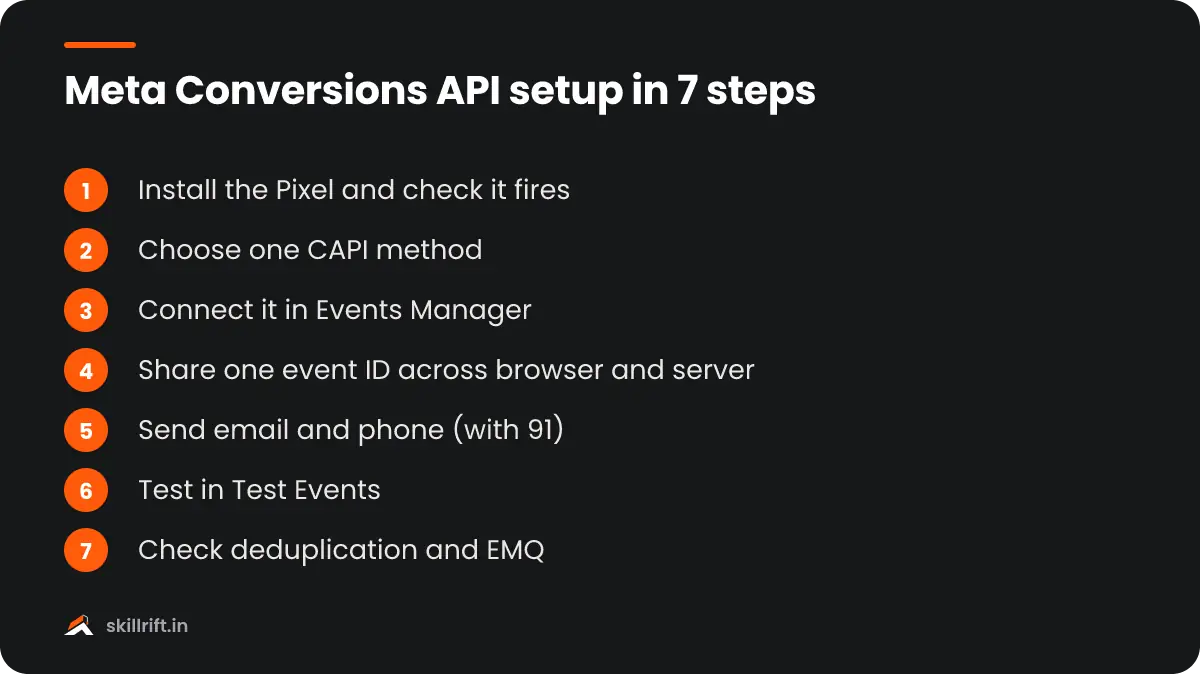
Follow these seven steps in order. Steps 1 to 3 connect the two sources, and steps 4 to 7 make sure Meta counts each conversion once and matches it to the right person.
Step 1: Install the Meta Pixel and check it fires
Create or find your Pixel (dataset) in Events Manager and install it on every page. Use the Meta Pixel Helper browser extension to confirm PageView, ViewContent, AddToCart, InitiateCheckout, Lead and Purchase fire where they should.
Step 2: Choose your Conversions API method
Use the table above to pick one route. Don’t run two CAPI routes for the same events, such as a plugin and a gateway, or you will create duplicates that are harder to clean up.
Step 3: Connect it in Events Manager
Open your dataset in Events Manager, go to Settings and follow the Conversions API setup for your chosen method. For a manual build, generate an access token there and store it on your server, never in page code.
Step 4: Send the same events with a shared event ID
Give each conversion one ID and send it as eventID from the Pixel and event_id from the server, with the same event name. Meta’s deduplication rules use that pair to count the event once.
Step 5: Add customer information parameters
Send the email address, phone number, IP address, user agent, click ID (fbc) and browser ID (fbp) where you have them. On a direct build, hash personal fields such as email and phone with SHA-256 before sending (plugins and one-click setups do this for you), and include the 91 country code on Indian numbers.
Step 6: Test events with the Test Events tool
Open the Test Events tab, place a test lead or order and check that each event arrives from both Browser and Server. Fix any missing parameters or wrong event names before you go live.
Step 7: Check deduplication and Event Match Quality
After a few days of real traffic, open each event in Overview and confirm it shows as deduplicated and has a healthy Event Match Quality score. Then compare purchases in Events Manager with real orders in your store.
What is Event Match Quality and how do you improve it?
Event Match Quality (EMQ) is Meta’s score out of 10 for how well your server events can be matched to Meta accounts. A higher score means more conversions can be attributed and used to optimise your ads.
Meta’s Conversions API best practices say an event’s EMQ score indicates how effective its customer information may be, that only matched events can be used for attribution and delivery, and that EMQ is currently shown only for web events. To raise it:
- Send email and phone on every event where the visitor has given them, not only on Purchase.
- Pass the fbc and fbp values from the browser to your server so they travel with server events.
- Always include the client IP address and user agent for website events.
- Format data before hashing: lower-case emails, digits-only phone numbers with the 91 country code.
- Use an external ID, such as your customer ID, consistently across browser and server.
How does event deduplication work?
Meta treats a browser event and a server event as one when the event name and event ID match. According to Meta’s deduplication guide, events are only deduplicated if they arrive within 48 hours of the first event with that ID.
Without deduplication, the same purchase can be counted twice, once from the Pixel and once from the server. That inflates conversions and ROAS and misleads the algorithm. If you can’t send an event ID, Meta allows matching on event name with fbp or external ID instead, but only for events where the browser fires first.
How do Indian businesses track WhatsApp, COD and offline sales with CAPI?
Send these conversions from wherever the sale is confirmed, usually your CRM or order system, through the Conversions API. The Pixel cannot see a sale that closes on WhatsApp, on a phone call or on cash-on-delivery.
- Cash on delivery: fire a server Purchase when the order is placed, and consider a separate custom event when it is delivered and paid, so you can see real revenue.
- WhatsApp and phone leads: store the click ID with the lead in your CRM, then send a server event when the lead becomes qualified or converts.
- OTP login sites: many Indian stores log customers in by mobile number, which gives you a phone number to send with every event and helps match quality.
On consent, follow India’s Digital Personal Data Protection Act, 2023: tell visitors in your privacy notice that you share data with advertising partners such as Meta, collect consent where needed and send only the fields you need. This is general guidance, not legal advice, so check with a professional for your business.
How do you know your Conversions API setup is working?
It works when key events arrive from both browser and server, show as deduplicated, and roughly match your real orders or leads. Check these four things every month.
- Events Manager shows Browser and Server as sources for each key event.
- Purchase and Lead counts are close to your store or CRM numbers, not double.
- Event Match Quality is stable or rising for Purchase and Lead.
- Reported cost per result in Ads Manager makes sense against real revenue.
Industry data backs the effort: PPC Land, citing the IAB, reports that two-thirds of advertisers reported improved return on ad spend after CAPI implementation. Measure your own result by comparing cost per purchase for 30 days before and after, and work out return with our ROAS calculation guide. Also note that Meta’s newer on-device measurement can raise reported conversions, as we explained in what Meta changed on 12 November.
Clean conversion data matters most for automated campaigns. Once CAPI is live, read how to set up Meta Advantage+ campaigns, and to learn tracking and paid media properly, see the SkillRift performance marketing course.
Our Take
Start with the simplest route that covers your Purchase or Lead event, and get that one event right before you add the rest. For most small stores that is the official platform app or Meta’s one-click setup, not a custom build. Then spend your effort on deduplication and on sending phone numbers with the 91 code, because that is where most Indian setups lose value. Finally, judge success against your real orders, not against Ads Manager. If reported purchases jump and your bank account doesn’t, you have a counting problem, not a winning campaign.
Common mistakes with the Meta Conversions API
Most broken setups double-count conversions or send too little customer data. Avoid these.
- Sending Pixel and server events without a matching event ID, so purchases count twice.
- Running two CAPI routes at once, such as a plugin and a gateway.
- Using different event names in the browser and on the server.
- Sending phone numbers without the 91 country code or with spaces and symbols.
- Putting the access token in website code where anyone can read it.
- Turning off the Pixel after CAPI goes live.
- Never comparing Meta’s purchase count with real orders.
Frequently asked questions
Is Meta Conversions API free?
Meta does not charge for the Conversions API itself, and it describes its Meta-enabled one-click setup as having no costs. Some other routes, such as a server-side tag manager host or a paid connector app, carry their own hosting or subscription fees.
Can I use the Conversions API without the Meta Pixel?
You can, but Meta recommends running the Conversions API alongside the Pixel and sending the same events through both. The Pixel catches browser signals and the server covers events the browser misses.
How long does it take for Conversions API events to show in Events Manager?
Test events usually appear in the Test Events tab within a few minutes of firing. Event Match Quality and deduplication figures take longer to settle, so check them again after a few days of real traffic.
Key takeaway: set up the Meta Conversions API alongside the Pixel, not instead of it. Send the same events from both with a shared event ID, add email and phone with the 91 code, check deduplication in Test Events, and judge the result against your real orders.