How to Set Up a Performance Max Campaign and Keep Control
A step-by-step way to set up a Performance Max campaign in Google Ads, with the exclusions, reports and budget checks that keep you in control.
To set up a Performance Max campaign, fix conversion tracking first, pick a Sales or Leads objective, set bidding and budget, then build an asset group with text, images, video, audience signals and search themes. You keep control through negative keywords, brand exclusions, URL settings and the search terms and channel reports.
What is a Performance Max campaign?
Performance Max is a goal-based Google Ads campaign type that shows your ads across all of Google’s inventory from one campaign. You give it goals, a budget and creative assets, and Google’s AI decides where and to whom each ad appears.
Google’s help page About Performance Max campaigns lists the channels: Search, YouTube, Display, Discover, Gmail and Maps. Unlike a Search campaign, you do not choose keywords. You guide the system with signals and then steer it with exclusions.
Google’s own figures explain why it pushes this format. Its Performance Max best practices guide says that, outside retail, advertisers who adopt it see on average 27% more conversions or value at a similar cost per action or return on ad spend (Google data, global, October to November 2023). Treat that as Google’s average, not a promise for your account.
Free playbook
Get the free Google Ads Playbook
A 25-page guide covering account setup, conversion tracking, keywords, ads, bidding, Performance Max, a 30-day launch plan, an audit checklist and templates. We email it to you, plus occasional new guides. Unsubscribe anytime.
When should you use Performance Max instead of Search?
Use it when conversion tracking is reliable and you already get steady conversions. If the account is new or the budget is very small, a plain Search campaign is easier to control and learn from.
| Situation | Better choice | Why |
|---|---|---|
| New account, no conversion data yet | Search campaign | You see every keyword and search term and learn what converts |
| Online store with a Merchant Center product feed | Performance Max | It can show Shopping ads plus other channels from one campaign |
| Lead generation with offline sales | Search first, then test Performance Max | Without lead quality data, it optimises for cheap form fills |
| Local shop that wants calls and visits | Performance Max with location assets | It can reach Maps and local inventory |
| Budget of a few hundred rupees a day | Search campaign | Spend spread across six channels gives too little data on each |
If you are still setting up your first campaigns, start with our hub on how to run Google Ads and the guide to Google Ads on a small budget.
What do you need before you create the campaign?
You need working conversion tracking, a clear goal and your creative assets ready. Google’s setup guide warns that campaigns without conversion tracking may have limited spend.
- Conversion actions: purchases, leads or calls set up and added as goals. Google says to allow 24 to 48 hours for new conversion data to update.
- Conversion values: real order values for a store, or an estimated value per lead.
- Business name and logo: the name should match your verified legal name or domain to avoid disapproval.
- Assets: headlines, descriptions, images in landscape and square shapes, and at least one video.
- Product feed: a linked Merchant Center account if you sell online.
- Audience lists: customer lists or website visitors, if you have them.
If tracking is not in place, do that first with our Google Tag Manager setup guide.
How do you set up a Performance Max campaign step by step?
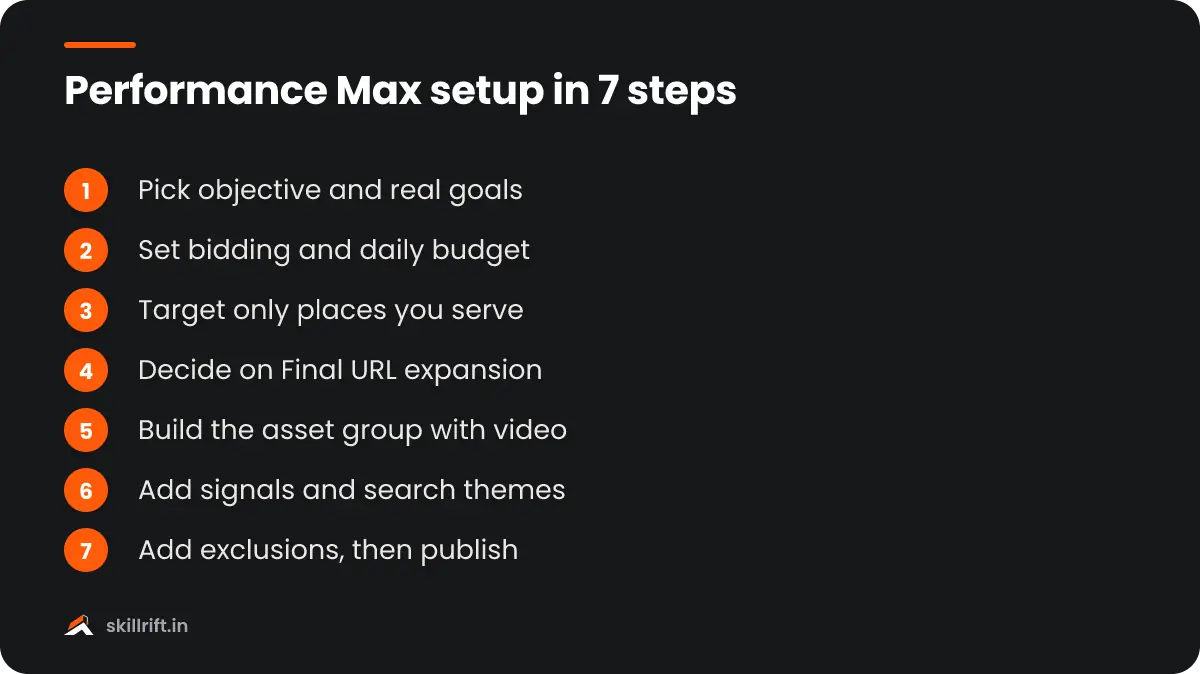
Create a new campaign, choose your objective and Performance Max, then work through bidding, settings and the asset group. The seven steps below follow the order of the Google Ads setup flow.
Step 1: Choose the objective and conversion goals
Start a new campaign and pick Sales, Leads or Local store visits and promotions, then select Performance Max as the type. Keep only the conversion goals that mean real business, such as purchases or qualified leads, and remove soft goals like page views.
Step 2: Set bidding and the daily budget
Choose to maximise conversions or conversion value, and leave the target CPA or target ROAS empty or loose at the start. Google advises against overly restrictive targets because they limit reach. Add a target later, once you have a few weeks of data.
Step 3: Set locations, languages and the schedule
Target only the places you can serve, for example specific cities or PIN codes instead of all of India. In the location options, choose people who are in your locations, not people merely interested in them, if you only serve locally.
Step 4: Decide on Final URL expansion and text customisation
Decide whether Google may send traffic to other pages on your site and write extra ad text. Google reports an average increase of over 9% in conversions or conversion value for advertisers who use Final URL expansion, but it can also send clicks to your blog or careers page. If you leave it on, exclude the URLs that should never receive ad traffic.
Step 5: Build the asset group
Add your final URL, headlines, long headlines, descriptions, images, logos and videos for one theme or product category. Upload your own video. Google’s best practices guide says advertisers who added at least one video to an asset group saw on average 12% more total conversions, and if you add none, Google may auto-generate one from your images.
Step 6: Add audience signals and search themes
Add your customer lists, website visitors and a few custom segments as audience signals, and add search themes that describe what your buyers type. These are hints, not strict targeting, so Google can go beyond them. You can now add up to 50 search themes per asset group, up from 25.
Step 7: Add exclusions, then publish
Before you publish, add campaign-level negative keywords, brand exclusions and any placement exclusions. Then review the summary and launch. Google says ad review usually takes 1 to 2 days.
How do you keep control of a Performance Max campaign?
You control it through inputs and exclusions, not through bids on keywords. Google has added several controls since 2025, and its announcement Unlock more visibility and control in Performance Max lists the main ones.
| Control | What it does | Use it when |
|---|---|---|
| Campaign-level negative keywords | Blocks searches on Search and Shopping inventory | You see irrelevant or low-intent terms such as “free” or “jobs” |
| Negative keyword lists | Applies one shared list to several campaigns | You run more than one campaign with the same exclusions |
| Brand exclusions | Stops ads on searches for brands you choose, including your own | Your Search campaign should handle your brand name |
| Final URL expansion and URL exclusions | Limits which pages get traffic | Clicks land on blog, policy or careers pages |
| Device and age targeting | Limits who sees ads by device or age range | The product suits only certain devices or age groups |
| Placement and content suitability | Keeps ads off chosen sites, apps and content types | You see poor-quality app or video placements |
| Search themes and audience signals | Points the system at the right intent | The campaign drifts towards unrelated searches |
Google has been open that advertisers asked for this. When it announced brand exclusions in 2023, Google’s Tim Frank put it this way:
We’ve heard your feedback that you want more ways to steer how Performance Max works on Search and Shopping inventory.
Tim Frank, Senior Director of Product Management, Google Ads, in New ways to multiply your results with Performance Max (February 2023)
One limit remains. You can see which channel brought results, but you cannot set a separate budget for each channel inside one campaign.
Which Performance Max reports should you check?
Check the search terms report, the channel performance report and asset reporting. Together they show what people searched, where the money went and which creatives worked.
- Search terms: Google’s announcement says search terms reporting is available for all Performance Max campaigns. Use it weekly to find negative keywords.
- Channel performance: shows results split by Search, YouTube, Display and the other channels. It was introduced as a beta in 2025.
- Asset reporting: shows conversions, cost and clicks for each asset, so you can replace weak headlines and images.
- Auto-created assets: lists the text and pages Google generated through text customisation and Final URL expansion. Remove the ones that are off-brand.
- New versus returning customers: shows whether the campaign is finding new buyers or re-selling to existing ones.
Compare the platform numbers with your own orders or CRM. Our guide on how to calculate ROAS shows how to check whether reported revenue is profitable.
How long does Performance Max take to learn?
Expect one to two weeks of learning, and sometimes up to six weeks. Google’s setup guide gives these timings for automated bidding and asks advertisers to wait one or two conversion cycles after any significant change.
That means frequent edits slow things down. Changing the budget, bid target or assets every two days restarts the learning each time. Make one change, note the date and wait before you judge it.
If the campaign shows no impressions after three business days, Google suggests going through its troubleshooting guide. The usual causes are disapproved assets, a missing conversion goal or a target that is too tight.
How much budget does Performance Max need in India?
There is no official minimum, but the budget must be large enough to produce conversions every week. Google only says to set an adequate daily budget and avoid tight targets.
A practical way to size it is to work backwards. If one lead or sale costs you around ₹400 in your Search campaigns, a ₹500 daily budget buys about one conversion a day spread across six channels. That is thin data for the system to learn from. In that case, keep the money in Search until you can afford more, or run Performance Max for one product category only.
For stores, check your margins first. A campaign that hits its ROAS target can still lose money if the target ignores GST, shipping, returns and cash-on-delivery refusals.
Our Take
Do not hand over everything on day one. Start with Search, get conversion tracking right, and add Performance Max only when conversions come in steadily. On launch day, add your negative keyword list and exclude your own brand so it cannot take credit for people who were already searching for you. Then check search terms and the channel report every week for the first month. Automation works well when the inputs are clean. It does not fix weak tracking, a slow landing page or an offer nobody wants.
Common mistakes with Performance Max
Most problems come from poor inputs and impatience, not from the campaign type. Watch for these.
- Launching without reliable conversion tracking, or counting page views as conversions.
- Leaving Final URL expansion on without excluding blog, policy and careers pages.
- Not excluding your own brand, so the campaign looks better than it is.
- Uploading no video and letting Google auto-generate one.
- Setting a strict target ROAS or target CPA from the first day.
- Editing budgets and assets every few days during the learning period.
- Never opening the search terms and channel reports.
- For lead generation, optimising for form fills without feeding back which leads were genuine.
A weak landing page wastes this traffic too. Our conversion rate optimisation guide covers what to fix before you scale spend. To learn campaign setup, bidding and reporting with guided practice, see the SkillRift performance marketing course.
Frequently asked questions
Can you add negative keywords to Performance Max?
Yes. Campaign-level negative keywords are available in all Performance Max campaigns and apply to Search and Shopping inventory. You can also apply shared negative keyword lists across several campaigns.
Does Performance Max replace Search campaigns?
No. Search campaigns still give you exact control over keywords and ad text. Many advertisers run both, with Search for their most important keywords and brand terms and Performance Max for extra reach.
Performance Max learns from your conversion data, so first set up Google Ads conversion tracking step by step.
Can you see where Performance Max ads appear?
Partly. The channel performance report shows results by channel, the search terms report shows queries and placement reporting shows where ads ran. You cannot set a budget for each channel.
Key takeaway: a Performance Max campaign rewards clean inputs. Get tracking right, give it good assets and honest goals, add exclusions on day one and read the reports every week.